Add New Tag
Overview
Please make sure you have read the tag information. More info here.
Tag Placeholder
Placeholders should be short references, these are used to identify the tag. Examples:
{tag1}
[tag1]
%%tag1%%
Dynamic code tags (below) must be entered as shown in the reference window.
{tag1}
[tag1]
%%tag1%%
Dynamic code tags (below) must be entered as shown in the reference window.
Tag Value or Dynamic Field Reference Code
Tag Value = For standard tag value, this is the value that appears in message emails where the above placeholder is used.
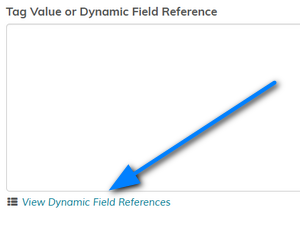
Dynamic Field Reference = If you use a dynamic reference code it will auto map to the additional signup form field. Click the "View Dynamic Field References" link below the textarea to view available references, these must be entered exactly as seen.
All dynamic tags must have the format "<dynamic:field_name>" or else they are ignored and parsed as standard tags. For example, let's say you have a custom field called "enter_country", you can set this up as a dynamic tag to use in messages. For this example the dynamic tag would be "<dynamic:enter_country>". You would then use "<dynamic:enter_country>" in your messages and the value will parse as the value entered by the visitor.
See how to pass custom fields in your signup forms in the form creation section here.
Clicking the small crosshair, top right, in the textarea will expand the area giving you more room to type.

Dynamic Field Reference = If you use a dynamic reference code it will auto map to the additional signup form field. Click the "View Dynamic Field References" link below the textarea to view available references, these must be entered exactly as seen.
All dynamic tags must have the format "<dynamic:field_name>" or else they are ignored and parsed as standard tags. For example, let's say you have a custom field called "enter_country", you can set this up as a dynamic tag to use in messages. For this example the dynamic tag would be "<dynamic:enter_country>". You would then use "<dynamic:enter_country>" in your messages and the value will parse as the value entered by the visitor.
See how to pass custom fields in your signup forms in the form creation section here.
Clicking the small crosshair, top right, in the textarea will expand the area giving you more room to type.