Add New Message
Overview
Please make sure you have read the message information. More info here.
NOTE: If a message is added to more than 1 campaign, the SMTP settings used will be for the first campaign
NOTE: If a message is added to more than 1 campaign, the SMTP settings used will be for the first campaign
General » Message Name/Ref
Enter message or reference name/code. For backend ops only.
General » Email Subject
Enter email subject.
View Tags - Click to view personalisation tags. You can also add custom tags. Note that for the HTML email, you DO NOT use any HTML code around the tags. Just the tag variables as shown.
Manage Templates - Click to open the template manager window. Here you can save, load or delete templates.
View Tags - Click to view personalisation tags. You can also add custom tags. Note that for the HTML email, you DO NOT use any HTML code around the tags. Just the tag variables as shown.
Manage Templates - Click to open the template manager window. Here you can save, load or delete templates.
General » Message Body - HTML Version
Required if HTML emails are enabled. Enter html version of message. If you have the Wysiwyg editor enabled, use the buttons provided
to format the code. See below.
View Tags - Click to view personalisation tags. You can also add custom tags. Note that for the HTML email, DO NOT wrap the tags in HTML link tags. Just the tag variables as shown. Please see the note below about the %browser_view% tag.
Manage Templates - Click to open the template manager window. Here you can save, load or delete templates.
Tracking Links - Click to show tracking links. Use box to search tracking links for tracking code.
Preview HTML Email - Click to show preview of the HTML email. Note that tags will not be parsed in the preview and multimedia content may not view the same due to formatting. It is recommended you send a test email to yourself to fully test the HTML messages. If the message is enabled a send button will appear at the top of the preview.
HTML messages can be disabled in the settings
More info on the Wysiwyg functions here.
View Tags - Click to view personalisation tags. You can also add custom tags. Note that for the HTML email, DO NOT wrap the tags in HTML link tags. Just the tag variables as shown. Please see the note below about the %browser_view% tag.
Manage Templates - Click to open the template manager window. Here you can save, load or delete templates.
Tracking Links - Click to show tracking links. Use box to search tracking links for tracking code.
Preview HTML Email - Click to show preview of the HTML email. Note that tags will not be parsed in the preview and multimedia content may not view the same due to formatting. It is recommended you send a test email to yourself to fully test the HTML messages. If the message is enabled a send button will appear at the top of the preview.
HTML messages can be disabled in the settings
More info on the Wysiwyg functions here.
Optional WYSIWYG Editor
If enabled, a Wysiwyg editor is shown for the HTML email textarea. This enables you to easily format HTML messages. See the following
animation for a few examples.
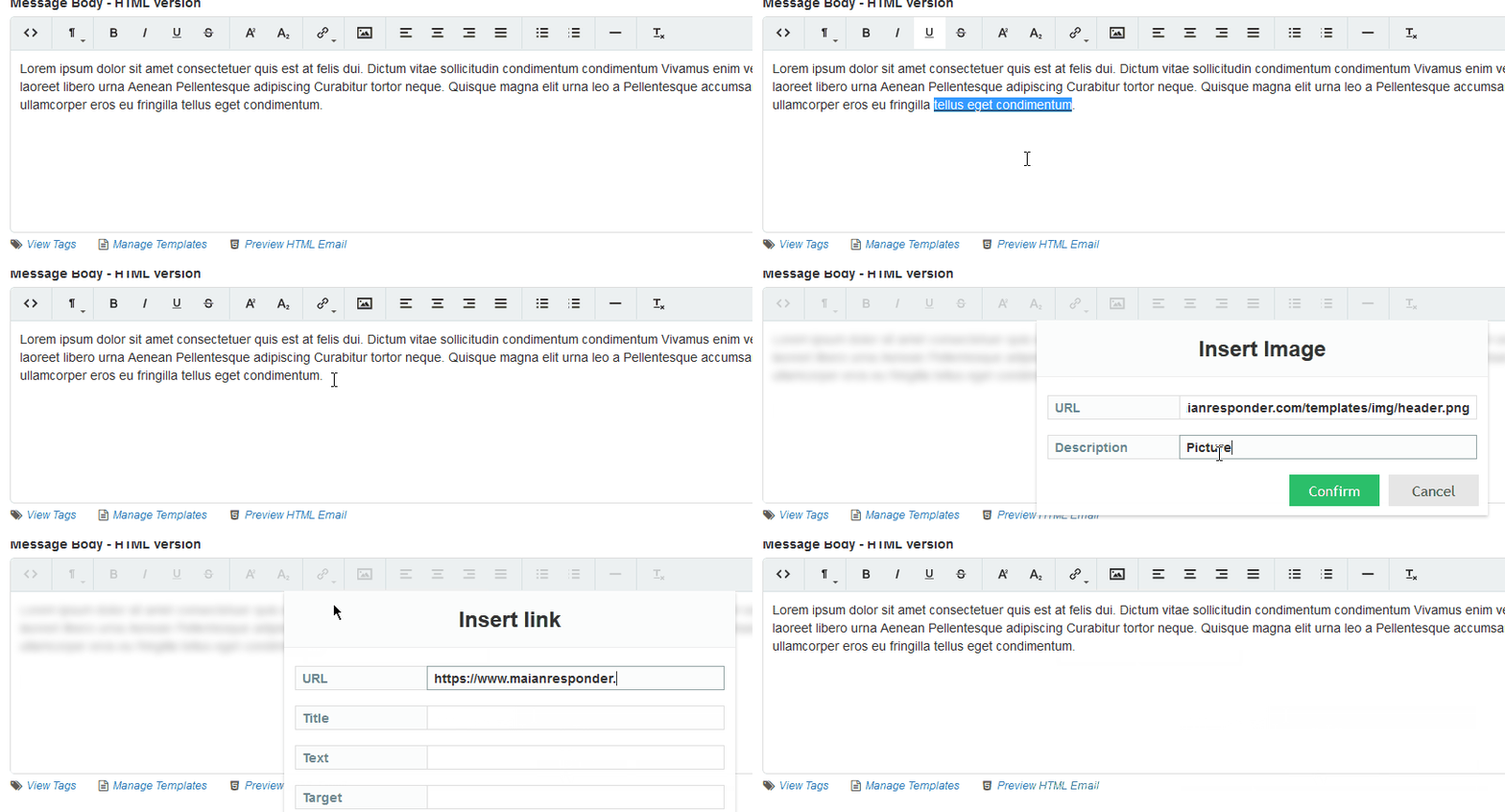
To enter raw HTML, click the <> button. Note that for security, <script> tags are NOT allowed.
More info on the Wysiwyg functions here.
To enter raw HTML, click the <> button. Note that for security, <script> tags are NOT allowed.
More info on the Wysiwyg functions here.
General » Message Body - Plain Text Version
REQUIRED. Enter plain text version of message.
View Tags - Click to view personalisation tags. Please see the note below about the %browser_view% tag.
Manage Templates - Click to open the template manager window. Here you can save, load or delete templates.
Tracking Links - Click to show tracking links. Use box to search tracking links for tracking code.
Create from HTML - Auto parses html text into plain text (only shown if HTML emails are ON). Note that certain unicode characters may not convert correctly, so check. Also, formatting on plain text may not be 100% as this feature is experimental.
Plain text messages can be more reliable that HTML emails as they don't cause as many issues as HTML emails with spam blockers. Plain text messages must always be included.
View Tags - Click to view personalisation tags. Please see the note below about the %browser_view% tag.
Manage Templates - Click to open the template manager window. Here you can save, load or delete templates.
Tracking Links - Click to show tracking links. Use box to search tracking links for tracking code.
Create from HTML - Auto parses html text into plain text (only shown if HTML emails are ON). Note that certain unicode characters may not convert correctly, so check. Also, formatting on plain text may not be 100% as this feature is experimental.
Plain text messages can be more reliable that HTML emails as they don't cause as many issues as HTML emails with spam blockers. Plain text messages must always be included.
Expand Textarea
Clicking the small crosshair, top right, in any textarea will expand the area giving you more room to type.

Note: If the Wysiwyg editor is enabled, this will have it's own full screen option.
Note: If the Wysiwyg editor is enabled, this will have it's own full screen option.
General » Enable Message
Enables or disables follow up message.
Campaigns
Choose which campaigns will trigger this message. If no campaigns are
selected, message is added to all campaigns by default.
Search Attachments To Include With Message
If applicable, select attachments you wish to include with this message. Use the search box to locate attachments. Search requires min 3 characters
and searches attachment name and file name.
When an attachment is selected you can use the download option to download the attachment or if it is an image type you can use the quick preview option by clicking the image type. eg: PNG, JPG etc.

When an attachment is selected you can use the download option to download the attachment or if it is an image type you can use the quick preview option by clicking the image type. eg: PNG, JPG etc.
Frequency » Send Interval
Immediately After Subscription Occurs - Check this option to send an email out immediately after a subscription occurs. This isn't triggered by the autoresponder cron job, instead the
system looks for this option being enabled immediately after a subscription occurs and sends the message.
X Days X Hours X Mins - After Subscription Occurs - Sends out the message from the specified time. For example, if you specify 7 days, the message is sent 7 days after the subscription has occurred. Note that the send time is actually governed by the time you have your cron job running. The message is actually queued to be sent the next time the cron runs. So, for example, if you set a time of 10mins and your cron is running hourly, the message will actually be sent at the top of the next hour.
X Days X Hours X Mins - After Subscription Occurs - Sends out the message from the specified time. For example, if you specify 7 days, the message is sent 7 days after the subscription has occurred. Note that the send time is actually governed by the time you have your cron job running. The message is actually queued to be sent the next time the cron runs. So, for example, if you set a time of 10mins and your cron is running hourly, the message will actually be sent at the top of the next hour.
Frequency » Repeat Options
No Repeat - If this option is set, message is sent once only.
Repeat On XX/XX/XXXX - If this option is sent, message is resent on specific day. If date has elapsed, it will be ignored.
Repeat Every X Days X Months X Years - If this option is set, message repeats via the duration set. For example if you set 7 days, message will repeat every 7 days from the duration of the initial send interval. You can set the maximum number of repeats if applicable and/or set the stop date. Note that if you set the stop date and the date has elapsed, it will be ignored and continue to send indefinitely.
Repeat On XX/XX/XXXX - If this option is sent, message is resent on specific day. If date has elapsed, it will be ignored.
Repeat Every X Days X Months X Years - If this option is set, message repeats via the duration set. For example if you set 7 days, message will repeat every 7 days from the duration of the initial send interval. You can set the maximum number of repeats if applicable and/or set the stop date. Note that if you set the stop date and the date has elapsed, it will be ignored and continue to send indefinitely.
Frequency » Subscribers » If Recurring, Send Only to Subscribers Who Joined Between
If the message is recurring it can be set to only be sent to subscribers who joined between a given date range.
Send Test
Click the icon to send a test message to make sure your smtp settings are working correctly. You can enter multiple addresses separated
with a comma and choose any autoresponder smtp settings to test.
%browser_view% Tag
If used the %browser_view% tag creates a link in emails where subscribers can view the HTML version of the message in their browser. This tag is removed when the person views
the message in the browser as it is not needed anymore.
The HTML version is wrapped in a new wrapper located at:
content/browser-view-wrapper.php
You may edit this if you wish. Note that if your message contains <body> tags, the only part of the message that loads in the browser view is what is between these tags, other data is ignored. Finally, this tag should only be included in the messages.
The HTML version is wrapped in a new wrapper located at:
content/browser-view-wrapper.php
You may edit this if you wish. Note that if your message contains <body> tags, the only part of the message that loads in the browser view is what is between these tags, other data is ignored. Finally, this tag should only be included in the messages.